Building a JS-first Popcorn app
View SourceHere, we will build a simple app that allows you to evaluate Elixir code written in a text area.
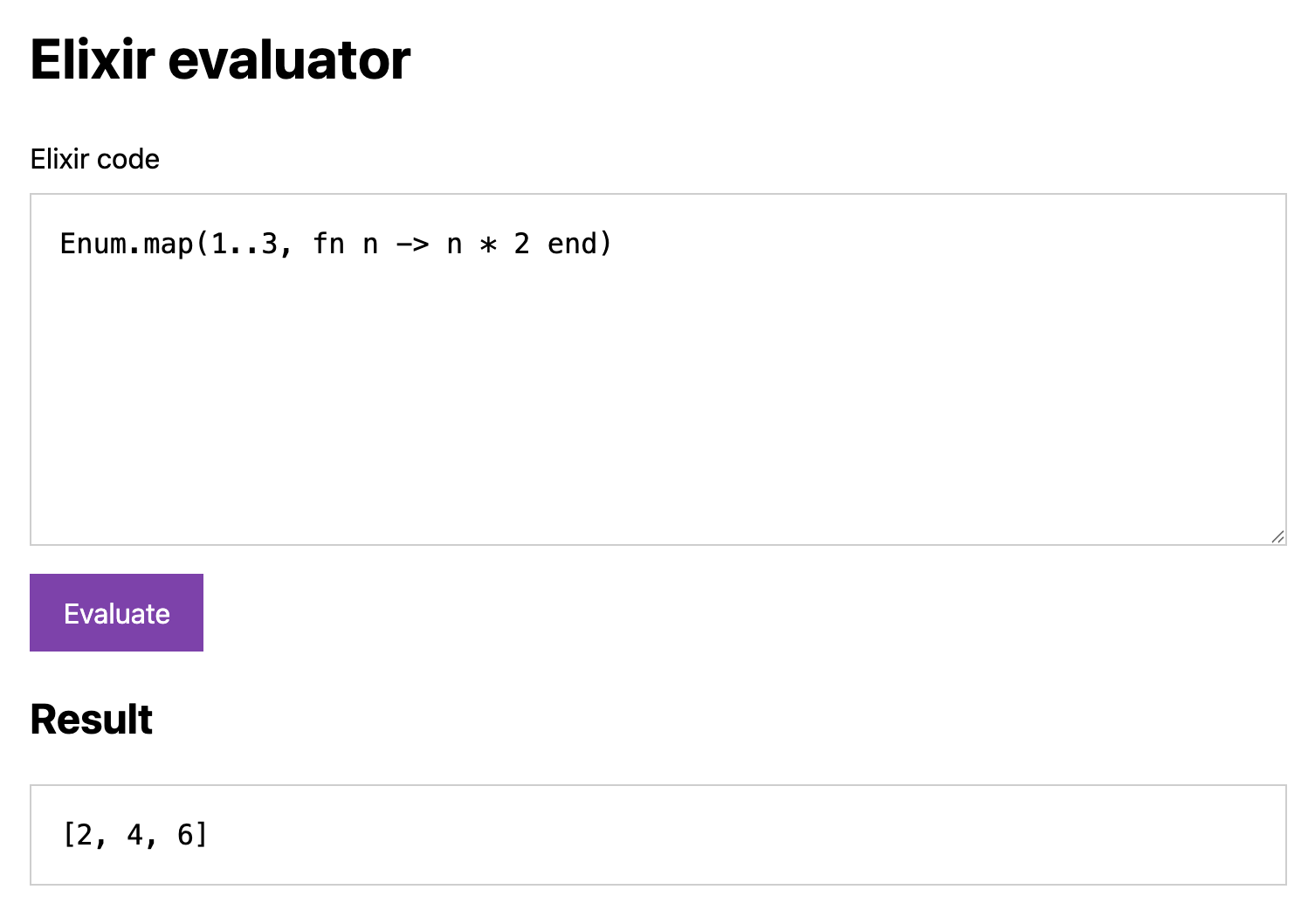
We will have an Elixir app inside the JavaScript project which will do the evaluation. We will write an evaluator GenServer and send messages to it from JavaScript using async popcorn.call(pid, payload, opts).
Learning Elixir?
We're covering the basics of Elixir used in this guide. If you're interested in learning more, check out "Elixir Language Tour". It's a long-form interactive tutorial, powered by Popcorn!
Project setup
We will use Vite for our webserver:
npm create vite@latestSelect Vanilla JavaScript and name the project eval. Don't install dependencies yet.
Need to install the following packages:
create-vite@9.2.1
Ok to proceed? (y) y

> npx
> create-vite

│
◇  Project name:
│  eval
│
◇  Select a framework:
│  Vanilla
│
◇  Select a variant:
│  JavaScript
│
◇  Install with npm and start now?
│  No
Enter the Vite project and install its dependencies and Popcorn:
cd eval
npm install @swmansion/popcorn@1.0.0
We also need an Elixir part of the application. Create a project named eval_wasm. For the best results, let's use the same Elixir and Erlang versions as Popcorn uses.
# We use `mise` to pin the toolchain. `asdf` or another method would work too.
mise use elixir@1.20.4-otp-29 erlang@29.0.6

mix new eval_wasm --sup
See "Installation" for detailed installation instructions and requirements.
Mix is Elixir's build tool and package manager. --sup generates an application with a Supervisor that starts and watches its worker processes.
Adding the package
Add Popcorn to eval_wasm/mix.exs:
# mix.exs
defp deps do
  [
    {:popcorn, "1.0.0"}
  ]
end
Fetch the Elixir dependency, then return to the Vite project directory:
cd eval_wasm && mix deps.get && cd ..Adding a plugin
To get the Elixir code in the browser, we need to pack our files and assets. Popcorn provides a Vite plugin for us to do that. Create a vite.config.js file in the Vite project's root:
// vite.config.js
import { defineConfig } from "vite";
import { popcorn } from "@swmansion/popcorn/vite";

export default defineConfig({
  plugins: [popcorn({ rootDir: "./eval_wasm" })],
});
rootDir points to the Elixir project. The plugin compiles and packages it, serves the runtime files, and sets the required browser headers during development.
Adding an HTML page
Replace index.html with this page:
<!-- index.html -->
<!doctype html>
<html lang="en">
  <head>
    <meta charset="UTF-8" />
    <meta name="viewport" content="width=device-width, initial-scale=1" />
    <style>
      body {
        max-width: 720px;
        margin: 3rem auto;
        padding: 0 1rem;
        font: 16px/1.5 system-ui;
      }
      textarea,
      pre {
        padding: 1rem;
        border: 1px solid oklab(85% 0 0);
        font: 1rem/1.5 monospace;
      }
      textarea {
        box-sizing: border-box;
        display: block;
        width: 100%;
        margin: 0.5rem 0 1rem;
        resize: vertical;
      }
      button {
        padding: 0.65rem 1.2rem;
        border: 0;
        font: inherit;
        color: oklab(100% 0 0);
        background: oklab(50% 0.1 -0.13);
        cursor: pointer;
      }
      button:disabled {
        opacity: 0.5;
      }
      pre {
        min-height: 1.5em;
        white-space: pre-wrap;
        overflow-wrap: anywhere;
      }
      .error {
        color: oklab(50% 0.15 0.05);
      }
    </style>
  </head>

  <body>
    <main>
      <h1>Elixir evaluator</h1>
      <form id="eval-form">
        <label for="code">Elixir code</label>
        <textarea id="code" rows="7" spellcheck="false">
Enum.map(1..3, fn n -> n * 2 end)</textarea>
        <button id="run" disabled>Evaluate</button>
      </form>
      <h2>Result</h2>
      <pre id="result"></pre>
    </main>
    <script type="module" src="/src/main.js"></script>
  </body>
</html>
Parts of the source are folded to hide unimportant things.
Important parts:
<textarea id="code">— here we write the code<button id="run">— where we click to execute the code<pre id="result">– and here we check what it did
Let's write a JavaScript part first.
JavaScript
To use Popcorn, you need a popcorn instance and an Elixir app it will run. It sets up the Web Workers, a VM, and communication between JavaScript and the Elixir app.
To communicate, we'll exchange messages. We only need one message that will send a string of Elixir code. It will run in a handler and we will send back the output of the code. A user that types code in the input may write incorrect Elixir code, so we will handle any errors sent by the VM too.
import { Popcorn } from "@swmansion/popcorn";

const form = document.querySelector("#eval-form");
const code = document.querySelector("#code");
const run = document.querySelector("#run");
const output = document.querySelector("#result");

function setBusy(busy) {
  run.disabled = busy;
}

function showResult(text, opts = {}) {
  const isError = opts?.isError ?? false;
  output.textContent = text;
  output.classList.toggle("error", isError);
}

function onEvaluate(callback) {
  form.addEventListener("submit", (event) => {
    event.preventDefault();
    callback(code.value);
  });
}

const popcorn = await Popcorn.init();
setBusy(false);

onEvaluate(async (source) => {
  setBusy(true);
  showResult("");

  const message = ["eval", source];
  const { ok, data, error } = await popcorn.tryCall("evaluator", message);
  setBusy(false);

  if (ok) {
    showResult(data.value);
  } else {
    showResult(error.message, { isError: true });
  }
});
We use await popcorn.tryCall("evaluator", message) to send messages to our (yet to come) Elixir handler. The first argument is a process we send a message to. We use "evaluator" here (which will be our process name). We use tryCall() because we want to get a response call from an evaluator.
Unlike call(), tryCall() returns {ok: true, data} or {ok: false, error}. This is perfect if we want to handle cases like timeouts.
Exceptions
Internally, Popcorn uses exceptions to communicate errors that aren't possible to handle (e.g. configuration errors). Structured errors from tryCall() are meant to be always actionable. If you don't want to handle any errors, call() converts structured errors to exceptions.
Elixir handler
We will register the worker as :evaluator and add it to the application's supervisor. Registration lets JavaScript find the process by name. The supervisor will restart it if it crashes.
Processes in Elixir are organized in a tree-like structure (supervision tree) which allows easy partial restarts when some part of the tree is misbehaving. This way, a single error doesn't destabilize our entire application. Processes also have roles: some of them are only concerned about watching other processes for malfunctions (Supervisor) and some of them do work (a GenServer in our case but there are a number of those like Task or Agent).
What is a GenServer?
Frequently in programming, there is a need for communication between two components in a request-response manner. In OTP/BEAM, because of the execution model, this comes up more frequently. There's no need to implement that logic over and over as the standard library provides it.
It's based on processes, of course. Compared to a bare process that we send/2 things to and receive/1 afterwards, GenServer gives us synchronous calls with timeouts, plugs into supervisors, and supports OTP tooling. See OTP Design Principles for the bigger picture.
Create eval_wasm/lib/eval_wasm/evaluator.ex:
# eval_wasm/lib/eval_wasm/evaluator.ex
defmodule EvalWasm.Evaluator do
  use GenServer

  def start_link(_args) do
    GenServer.start_link(EvalWasm.Evaluator, nil, name: :evaluator)
  end

  @impl true
  def init(_args), do: {:ok, nil}

  @impl true
  def handle_call(["eval", code], _from, state) do
    {value, _bindings} = Code.eval_string(code, [])
    {:reply, %{value: inspect(value)}, state}
  end
end
Replace the generated eval_wasm/lib/eval_wasm/application.ex to start the worker:
# eval_wasm/lib/eval_wasm/application.ex
defmodule EvalWasm.Application do
  use Application

  @impl true
  def start(_type, _args) do
    Application.put_env(:elixir, :ansi_enabled, false)

    children = [
      EvalWasm.Evaluator
    ]

    Supervisor.start_link(children, strategy: :one_for_one, name: EvalWasm.Supervisor)
  end
end
Let's go through it.
EvalWasm.Evaluator
This is the mentioned evaluation GenServer. It holds state and uses callbacks to customize behavior. In our case, we implement the init(args) callback which sets up the initial state and handle_call(message, from, state) which allows us to handle messages from other processes (and JavaScript in Popcorn).
We only use communication and don't hold any state, so we set the state to nil in init/1. nil is Elixir's equivalent to null.
In Elixir, the /1 and /3 notation shows how many arguments a function takes. The @impl true marks a callback implementation.
For the handler, we do three things:
- pattern-match a message
- evaluate
- send a reply back
Pattern match a message
Pattern matching checks a value's shape and extracts its parts, similar to destructuring with a check:
["eval", code] = ["eval", "1 + 2"]This binds code to "1 + 2". The same pattern in handle_call/3 accepts a two-element list beginning with "eval". JavaScript arrays become Elixir lists. A request with another shape crashes this worker.
Evaluate
Code.eval_string(code, []) env evaluates the source and returns {value, bindings}. Curly braces create a tuple: a fixed-size collection, often used for tagged results.
value is the evaluation result. bindings contains variables defined by the code. We discard it and start each request with empty bindings, so variables do not carry over between evaluations.
Send a reply back
%{value: inspect(value)} is an Elixir map, converted to {value: "..."} in JavaScript. inspect/1 formats the result as Elixir text, including values that cannot be sent directly to JavaScript.
{:reply, reply, state} tells GenServer to send the reply and keep its state unchanged.
Application supervisor
In application.ex we wire EvalWasm.Evaluator as the single child of the top-level supervisor. If it happens to crash, we can bet on the supervisor restarting it. One thing to note is that supervisors will themselves crash if restarting is too frequent — you can test it by spamming the "Evaluate" button. restarts
We set the configuration to not use ANSI. This makes rendering the result in JavaScript easier.
Start the runtime
We have both parts now.
The file tree looks like this:
eval/
├── eval_wasm/
│   ├── lib/eval_wasm/
│   │   ├── application.ex
│   │   └── evaluator.ex
│   ├── mix.exs
│   └── mix.lock
├── src/
│   └── main.js
├── index.html
├── package.json
├── package-lock.json
└── vite.config.js
Let's run and test it:
# in the project's root
npm run dev
Open the URL printed by Vite and click Evaluate. The initial code should return [2, 4, 6]. Try 1 + to see an error, then 1 + 2 to get 3.
Elixir code examples
We prepared a few examples to check out if you want to see how Elixir code is written.
Write the function to double the number and use it with a list
double = fn n -> n * 2 end
Enum.map([1, 2, 3], double)
Result: [2, 4, 6]. fn ... end defines an anonymous function, like a JavaScript arrow function. Enum.map/2 applies it to each list element.
Sleep a bit to see Popcorn's timeouts
Process.sleep(6_000)
:finished
The call times out after five seconds by default. The evaluator keeps running: a timeout stops waiting for a reply, but does not cancel the work. Process.sleep/1 pauses only the evaluator process, so the page stays responsive.
Use pipes to filter and map data
users = [%{name: "Ada", active: true}, %{name: "Grace", active: false}]

users
|> Enum.filter(fn user -> user.active end)
|> Enum.map(fn user -> user.name end)
Result: ["Ada"]. The pipe operator |> passes the result on its left as the first argument to the function on its right.
Spawn a process and receive its message
parent = self()
spawn(fn -> send(parent, {:hello, "ok"}) end)

receive do
  {:hello, message} -> message
end
Result: "ok". self/0 returns the current process's ID. spawn/1 starts another Elixir process, which sends a message to the evaluator. receive waits for a matching message and returns the value of its branch.
End result
That's the simplest evaluator you can build with Popcorn. We took this code a little bit further and built "Elixir Language Tour" which is a tutorial for learning Elixir. It's a much better resource for learning Elixir than this tutorial. We encourage you to check it out.
You now have a JavaScript UI calling an Elixir process in the browser. See Communicate with JavaScript for more APIs and Deployment for hosting requirements.
- ↩
There's
cast()for fire-and-forget messages andsend()if we want to communicate with any process, not justGenServer. - ↩
The second argument of
Code.eval_string(code, env)is the execution environment which holds things like already declared variables that aren't in the string. We don't need that behavior here, so we keep it as[]. - ↩
This might seem counterintuitive: why do we crash the component that should prevent crashes?
Answer: if we bubble up the pathological case of constant restarting, chances are, someone will notice a problem. A well-behaved application shouldn't restart constantly (also, this is configurable).