Building a complex Popcorn app
View SourceThis guide assumes you have Popcorn installed in a "Counters" application with a supervision tree. Adjust the names to match your application. See "Installation" for installation instructions.
In the previous guide, we created a simple app using Popcorn. Now, let's get a bit more ambitious and use more APIs for communication between JavaScript and Elixir. We will exchange events and talk back to Elixir from run! snippets.
Typically, guides go for an example showing a counter. As I said, we're a bit more ambitious, so let's create a Counter of Counters!
Rough plan
We will add an HTML page with a template for creating counters. Each counter will have a parent and will add its own HTML to the page, removing it if the counter process dies or its parent removes it. All of them will be under a DynamicSupervisor and have add/remove buttons with one special button to blow up the process.
The end result will look like this:
Running the dev server
Run this command from the project directory:
mix popcorn.devIt compiles and packages the application into public/out, then serves public with the headers required by the VM. Open http://localhost:4000.
Tip
On Linux, to get the live reload, install inotify-tools. It's needed for watching files.
Add an HTML template
Create a public directory. Our static assets will live there. We also need a directory where we will put the built app files. We will use public/out for that.
mkdir -p public public/out
# if you use Git for this example
echo "/public/out/" >> .gitignore
Now, add an HTML template in public/index.html:
<!doctype html>
<html>
  <head>
    <meta charset="utf-8" />
    <meta name="viewport" content="width=device-width, initial-scale=1" />
    <style>
      body {
        max-width: 960px;
        margin: 2rem auto;
        padding: 0 1rem;
        font-family: sans-serif;
      }

      .counter {
        container-type: inline-size;
        flex: 1 1 140px;
        min-width: 140px;
      }

      /* The first three levels wrap; deeper counters shrink until they become blocks */
      .counter .counter .counter .counter {
        flex: 1 1 0;
        min-width: 1.5rem;
      }

      fieldset {
        margin: 0;
        padding: 0.5rem;
        border: 2px solid #444;
      }

      p {
        margin: 0.5rem 0;
      }

      button {
        width: 1.75rem;
        height: 1.75rem;
      }

      .children {
        display: flex;
        flex-wrap: wrap;
        gap: 0.5rem;
        margin-top: 0.5rem;
      }

      /* Too small to use: show the counter as a compact block */
      @container (width < 120px) {
        fieldset {
          min-height: 1.5rem;
          padding: 0.25rem;
          border-width: 1px;
        }

        fieldset::before {
          content: "…";
          text-align: center;
          display: block;
        }

        fieldset > :not(.children) {
          display: none;
        }

        .children {
          gap: 0.25rem;
          margin-top: 0;
        }
      }
    </style>
  </head>
  <body>
    <main id="counters"></main>

    <template id="counter-tmpl">
      <div class="counter">
        <fieldset>
          <legend class="label"></legend>
          <p>Count: <output class="count">0</output></p>
          <button class="inc">+</button>
          <button class="dec">-</button>
          <button class="crash">💥</button>
          <div class="children"></div>
        </fieldset>
      </div>
    </template>

    <script type="module">
      import { Popcorn } from "./out/index.mjs";

      await Popcorn.init();
    </script>
  </body>
</html>
The styles and the rest of the HTML markup aren't that important. They're only there to make our page look half-decent.
Note
You might not have used <template> before. It holds HTML fragments which we will later attach to the page markup. Historically, this use-case was implemented purely in JavaScript and was harder to read.
Now, let's get to the actual logic.
OTP structure
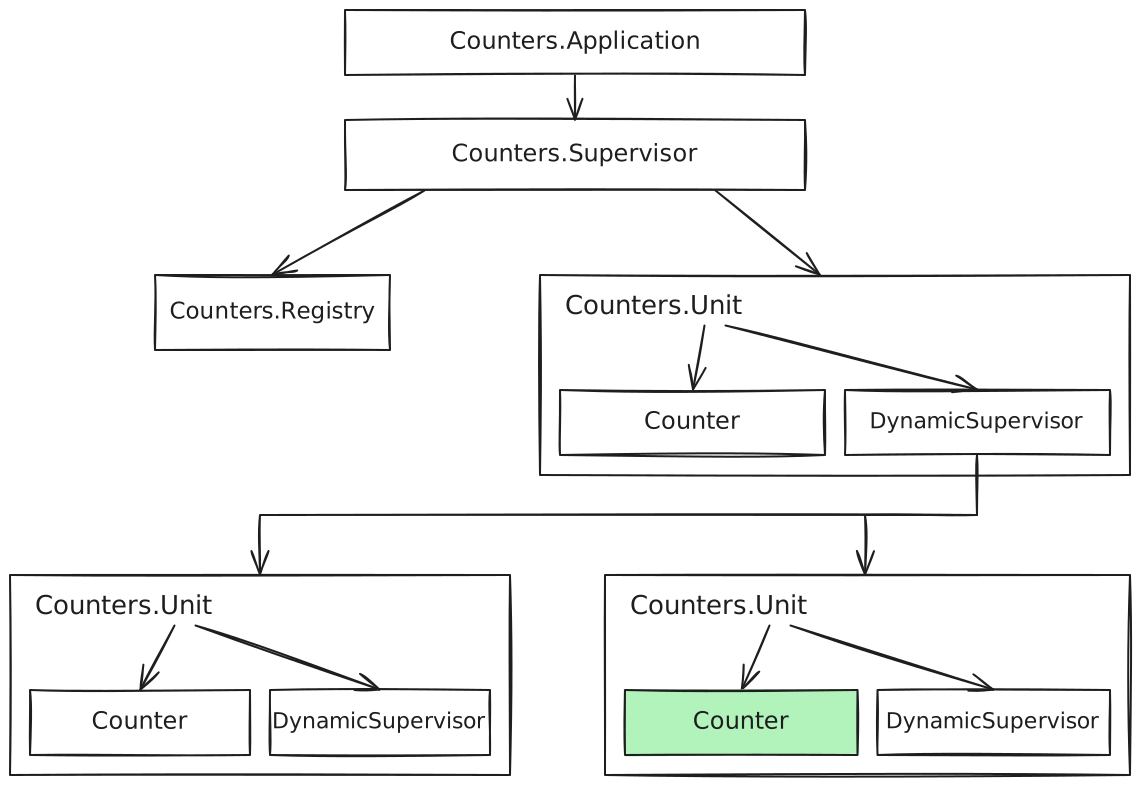
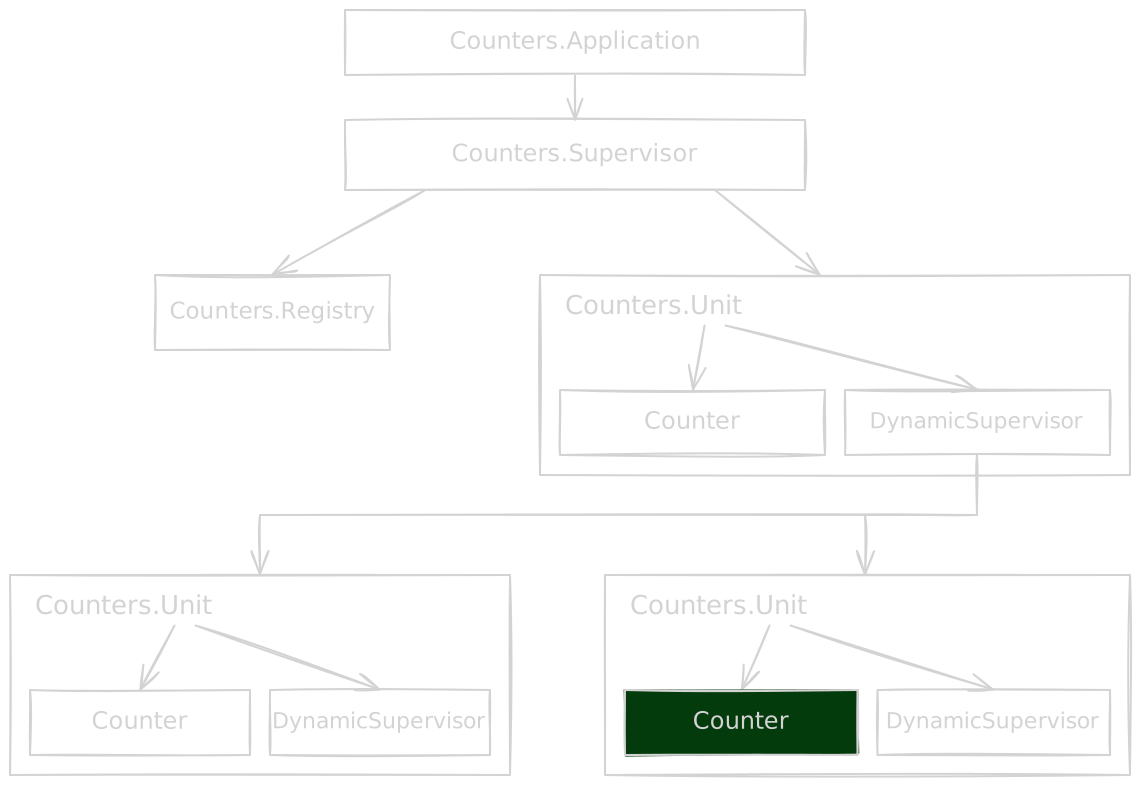
We will use a shared Registry for each Counter, and each Counter will also be paired with a DynamicSupervisor for its children. This creates a nice tree:
Add the HTML handling code
Create lib/counters/html.ex to manage the template from Elixir:
# lib/counters/html.ex
defmodule Counters.HTML do
  alias Popcorn.JS

  def find(root, selector) do
    """
    ({ root, selector }) => {
      const node = root.querySelector(selector);
      if (node === null) throw new Error(`No element matches ${selector}`);

      return new TrackedValue(node);
    }
    """
    |> JS.run!(%{root: root, selector: selector})
  end

  def on_click(node, event) do
    """
    ({ node, pid, event }, { cast }) => {
      node.onclick = () => cast(pid, event);
    }
    """
    |> JS.run!(%{node: node, pid: self(), event: event})
  end

  def set_count(counter, count) do
    """
    ({ counter, count }) => {
      counter.querySelector(".count").textContent = count;
    }
    """
    |> JS.run!(%{counter: counter, count: count})
  end

  def add_counter(container, id, label) do
    """
    ({ container, id, label }) => {
      const template = document.getElementById("counter-tmpl");
      const counter = template.content.firstElementChild.cloneNode(true);
      counter.querySelector(".label").textContent = label;
      counter.dataset.id = id;

      // A restarted counter goes back to its place, before the next higher id
      const parent = container ?? document.getElementById("counters");
      const next = [...parent.children].find((child) => Number(child.dataset.id) > id);
      parent.insertBefore(counter, next ?? null);

      return new TrackedValue(counter, () => counter.remove());
    }
    """
    |> JS.run!(%{container: container, id: id, label: label})
  end
end
Most of this is plumbing. Let's look at the Popcorn APIs it uses:
JS.run!()
"""
({ root, selector }) => {
  // ...
}
"""
|> JS.run!(%{root: root, selector: selector})
Popcorn.JS.run!/3 is a function that evaluates JavaScript source and hands the result back to Elixir. The first argument is JavaScript source, and the second is a map of arguments we want to pass from Elixir to it.
In the JavaScript source, we create a function to run. It takes two parameters: args (a map of passed arguments) and actions (a map of functions we can call — send(), cast(), call()).
In this case, we use JavaScript syntax to destructure the args object and assign variables. We could also write args.root and args.selector but destructuring is shorter.
return new TrackedValue()
TrackedValue is a JavaScript class that is treated specially when passing data to Elixir. It allows us to keep a reference to an object living on the JavaScript side. In find/2, we use it to keep an HTML node.
When Elixir releases the handle, through garbage collection or when the process holding it dies, Popcorn releases the JavaScript reference and runs the cleanup function. You can see it in add_counter/3:
({ container, id, label }) => {
  // ...
  return new TrackedValue(counter, () => counter.remove());
};
Info
This is part of Popcorn that makes it very easy to use unserializable values from JavaScript. Read more in Popcorn.JS.tracked_value/0.
cast()
Here's the full on_click/2 implementation:
def on_click(node, event) do

  """
  ({ node, pid, event }, { cast }) => {
    node.onclick = () => cast(pid, event);
  }
  """
  |> JS.run!(%{node: node, pid: self(), event: event})
end
Note that we pass the PID of the current process (pid: self()) and we pass it to the cast() function (cast(pid, event)). Together, these create a click handler in JavaScript that will send messages to our Counter processes later on.
Registry and supervisor
Before we get to the implementation, we need a DynamicSupervisor and a Registry for our Counters. Both are standard OTP components: the first allows us to dynamically modify the supervision tree (which we need to add and remove counters), and the second gives us a predictable name pattern to find Counter processes.
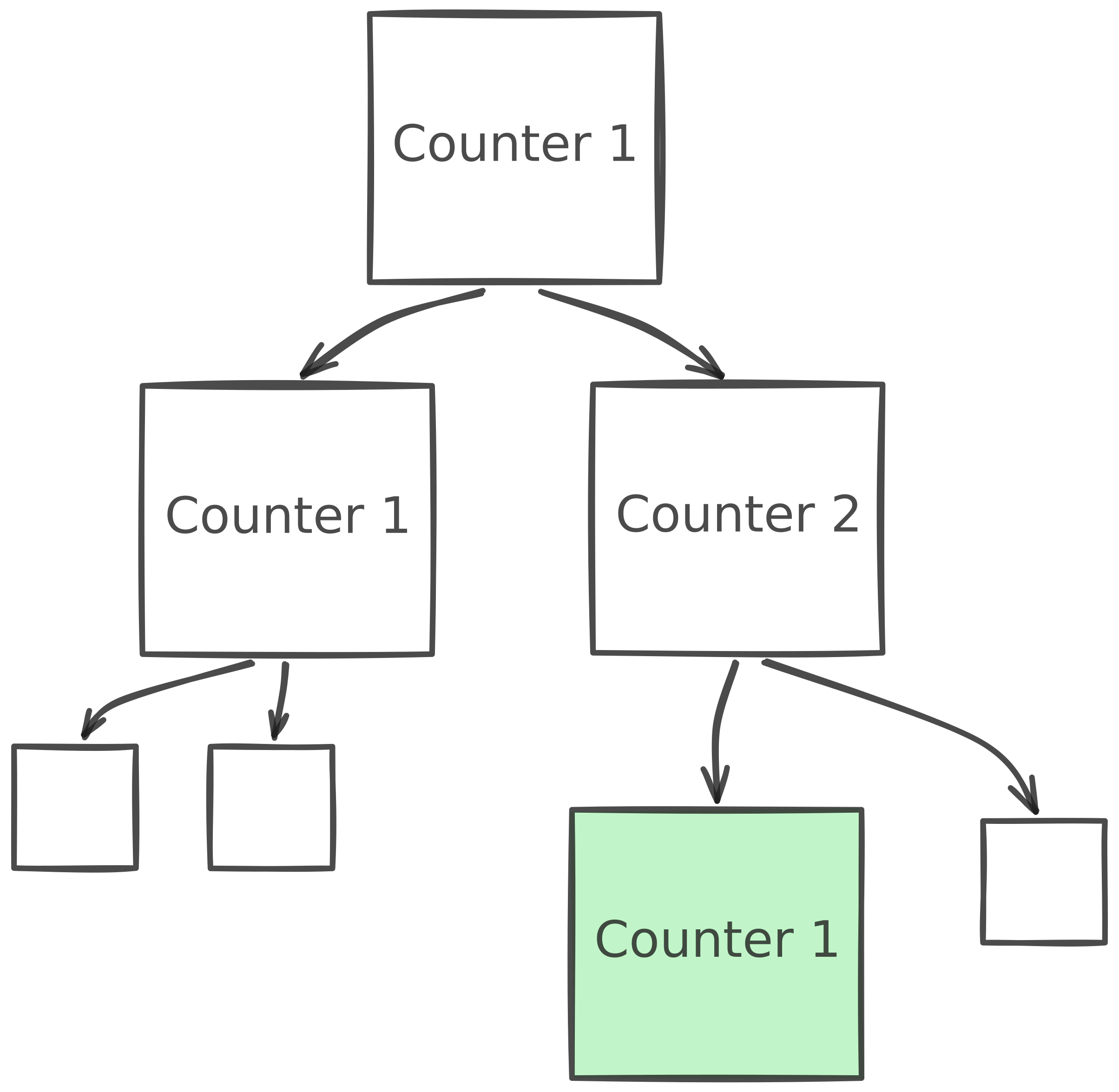
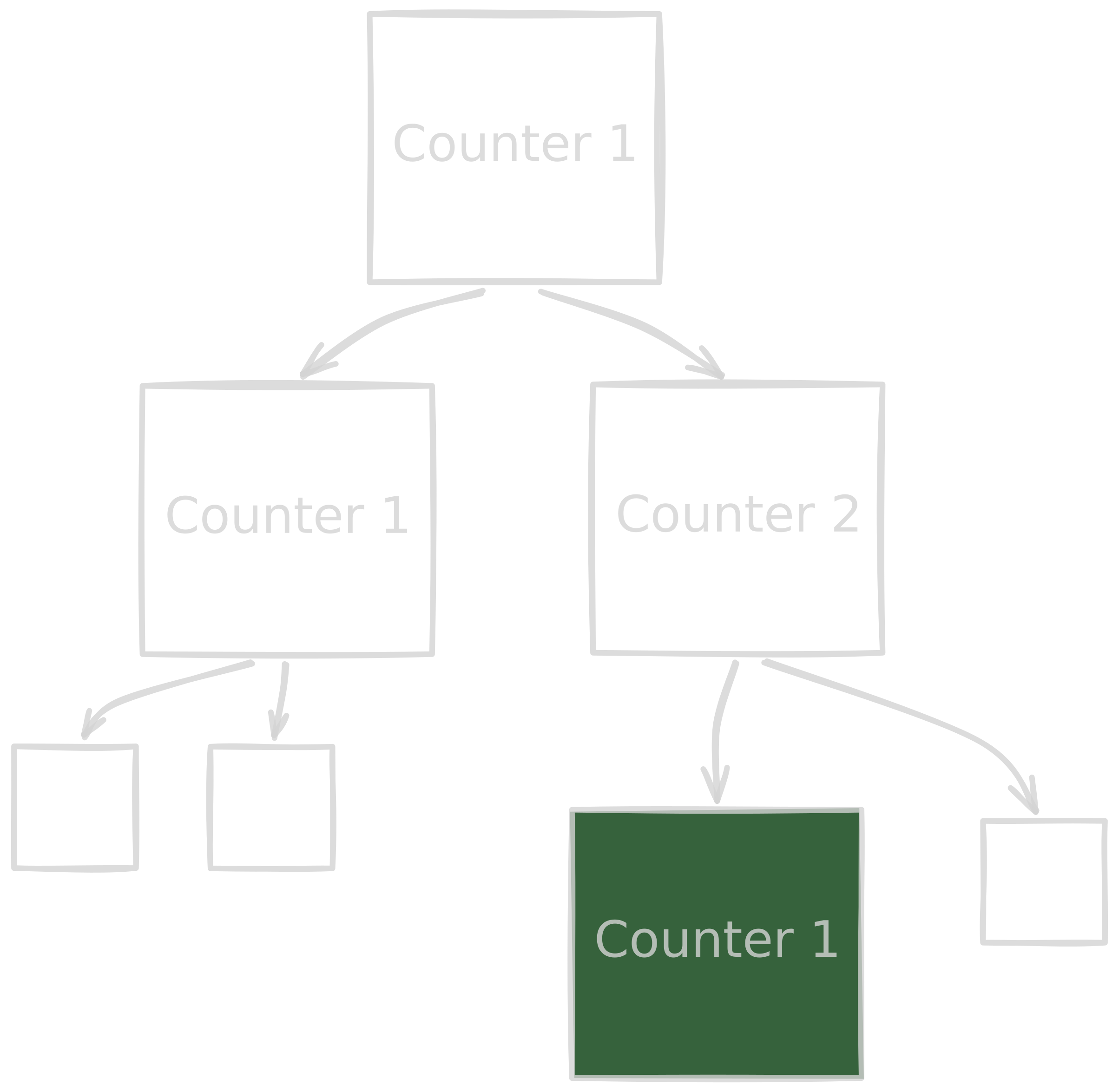
The Counters.Unit supervisor will keep a Counter and its children. In each Counter, we keep its path (e.g. 1.2.1, which is the one highlighted in the image) and the DOM node it is tied to.
Create lib/counters/unit.ex:
# lib/counters/unit.ex
defmodule Counters.Unit do
  use Supervisor
  alias Counters.Counter

  def start_link({path, container}) do
    Supervisor.start_link(__MODULE__, {path, container}, name: Counter.via({:unit, path}))
  end
  @impl true
  def init({path, container}) do
    children = [
      # The actual counter
      {Counter, {path, container}},

      # Supervisor for its children
      {DynamicSupervisor, name: Counter.via({:children, path})}
    ]

    # :rest_for_one, so `Counter` crash restarts its children too.
    Supervisor.init(children, strategy: :rest_for_one)
  end
end
Replace the generated lib/counters/application.ex with the following code.
# lib/counters/application.ex
defmodule Counters.Application do
  @moduledoc false

  use Application

  @impl true
  def start(_type, _args) do
    children = [
      # Registry for all counters
      {Registry, keys: :unique, name: Counters.Registry},

      # "Root" counter, to start off the recursion.
      {Counters.Unit, {[], nil}}
    ]

    Supervisor.start_link(children, strategy: :rest_for_one, name: Counters.Supervisor)
  end
end
Counter GenServer
Now we're ready to do useful work and handle the events we send from Counters.HTML.on_click/2. Starting with the module outline, we use the Registry and support three operations:
addwhich creates a new child counterremovewhich removes last counter from its childrencrashwhich explodes the GenServer and allows OTP to do its thing
Create lib/counters/counter.ex with the outline below. Replace its :todo callbacks with the implementations in the following sections, keeping them inside Counters.Counter. Add the Counters.HTML alias and private helpers inside the same module.
You can also copy the complete module from Full Counter source.
# lib/counters/counter.ex
defmodule Counters.Counter do
  use GenServer

  def start_link({path, container}) do
    GenServer.start_link(__MODULE__, {path, container}, name: via({:counter, path}))
  end

  def via(key), do: {:via, Registry, {Counters.Registry, key}}

  @impl true
  def init({path, container}) do
    {:ok, {path, container}, {:continue, :mount}}
  end

  @impl true
  def handle_continue(:mount, {path, container}), do: :todo

  @impl true
  def handle_cast("add", state), do: :todo
  def handle_cast("remove", state), do: :todo
  def handle_cast("crash", state), do: :todo
end
Mounting a counter in the page
Let's go through the implementation bit by bit. After creating a GenServer, we need to create a counter in the page, set the initial state, and register click handlers.
# lib/counters/counter.ex
alias Counters.HTML

@impl true
def handle_continue(:mount, {path, container}) do
  # Create a counter in HTML, removed when `node` is dropped by the GenServer.
  id = List.last(path, 0)
  node = HTML.add_counter(container, id, label(path))

  # Register click handlers for add, remove, and "crash" buttons.
  node |> HTML.find(".inc") |> HTML.on_click("add")
  node |> HTML.find(".dec") |> HTML.on_click("remove")
  node |> HTML.find(".crash") |> HTML.on_click("crash")

  # Find HTML node of container for its children
  children_node = HTML.find(node, ".children")

  {:noreply, update(%{path: path, node: node, children_node: children_node, count: 0})}
end

defp update(state) do
  HTML.set_count(state.node, state.count)

  state
end

defp label([]), do: "Counters"
defp label(path), do: "Counter #{Enum.join(path, ".")}"
Now, when we create a Counter, we get new markup on the page. The HTML is removed when we don't have access to node TrackedValue anymore (i.e. GenServer dies).
Notice how defining a few helpers improved readability of the "frontend" Elixir code. You could build an entire framework from that!
Adding a counter
A few things happen here:
- we construct the counter path (e.g. 1.2) and increment the counter's count.
- we use
via()to get the children supervisor and create a newCounterunder it. - we're passing
state.children_nodeas an HTML root for the new counter.
We don't manage the HTML lifecycle ourselves; it's directly tied to the GenServer's lifetime. If it dies, the HTML is removed from the page.
# lib/counters/counter.ex
@impl true
def handle_cast("add", state) do
  new_path = state.path ++ [state.count + 1]
  spec = {Counters.Unit, {new_path, state.children_node}}

  via_sup = via({:children, state.path})
  {:ok, _pid} = DynamicSupervisor.start_child(via_sup, spec)

  {:noreply, update(%{state | count: state.count + 1})}
end
Removing a counter
We leave the state unchanged when there are no child counters. Otherwise, we find the last child's unit supervisor and terminate it through the parent's children supervisor.
After calling DynamicSupervisor.terminate_child/2, the child counter is killed and Popcorn runs any TrackedValue destructors. In our case, we remove HTML from the page at that point.
# lib/counters/counter.ex
def handle_cast("remove", %{count: 0} = state), do: {:noreply, state}

def handle_cast("remove", state) do
  path = state.path ++ [state.count]
  via_unit = via({:unit, path})
  unit = GenServer.whereis(via_unit)

  via_sup = via({:children, state.path})
  :ok = DynamicSupervisor.terminate_child(via_sup, unit)

  {:noreply, update(%{state | count: state.count - 1})}
end
Crashing a counter
# lib/counters/counter.ex
def handle_cast("crash", _state), do: raise("boom")
Fortunately, here we don't need much work. OTP handles that for us. If you repeatedly crash the same counter, you may see its whole subtree disappear.
This is an OTP supervisor at work — if a child repeatedly crashes, it isn't possible to have a stable system. Therefore, it terminates all of its children and then itself.
End result
Your source files should now be:
counters/
├── lib/counters/
│   ├── application.ex
│   ├── counter.ex
│   ├── html.ex
│   └── unit.ex
├── public/
│   └── index.html
├── mix.exs
└── mix.lock
You should see the root counter labeled "Counters". Click + to add children, - to remove the last child, and 💥 to restart a counter and clear its children.
Dev server command reminder
mix popcorn.devFull Counter source
This is the complete lib/counters/counter.ex if you prefer skimming tutorials and code:
defmodule Counters.Counter do
  use GenServer

  alias Counters.HTML

  def start_link({path, container}) do
    GenServer.start_link(__MODULE__, {path, container}, name: via({:counter, path}))
  end

  def via(key), do: {:via, Registry, {Counters.Registry, key}}

  @impl true
  def init({path, container}) do
    {:ok, {path, container}, {:continue, :mount}}
  end

  @impl true
  def handle_continue(:mount, {path, container}) do
    # The counter is removed from DOM when we lose its handle (i.e. when process exits)
    id = List.last(path, 0)
    node = HTML.add_counter(container, id, label(path))

    node |> HTML.find(".inc") |> HTML.on_click("add")
    node |> HTML.find(".dec") |> HTML.on_click("remove")
    node |> HTML.find(".crash") |> HTML.on_click("crash")

    children_node = HTML.find(node, ".children")

    {:noreply, update(%{path: path, node: node, children_node: children_node, count: 0})}
  end

  @impl true
  def handle_cast("add", state) do
    new_path = state.path ++ [state.count + 1]
    spec = {Counters.Unit, {new_path, state.children_node}}

    via_sup = via({:children, state.path})
    {:ok, _pid} = DynamicSupervisor.start_child(via_sup, spec)

    {:noreply, update(%{state | count: state.count + 1})}
  end

  def handle_cast("remove", %{count: 0} = state), do: {:noreply, state}

  def handle_cast("remove", state) do
    path = state.path ++ [state.count]
    via_unit = via({:unit, path})
    unit = GenServer.whereis(via_unit)

    via_sup = via({:children, state.path})
    :ok = DynamicSupervisor.terminate_child(via_sup, unit)

    {:noreply, update(%{state | count: state.count - 1})}
  end

  def handle_cast("crash", _state), do: raise("boom")

  defp update(state) do
    HTML.set_count(state.node, state.count)

    state
  end

  defp label([]), do: "Counters"
  defp label(path), do: "Counter #{Enum.join(path, ".")}"
end